The error is visible in both versions
A person submits an invalid email value. Both versions display the same error text and move focus to the email field. Their error-state screenshots are identical. The changed implementation no longer marks the input invalid or associates it with the error message.
This is a controlled browser experiment on two fictional Fieldnotes forms. It records DOM attributes, visible text, focus and recovery. It does not record speech from a screen reader, claim that every assistive technology behaves the same way, or certify WCAG conformance.
What the interaction revealed
The harness fills the field with bad and activates Continue. The form uses novalidate so its authored validation branch runs consistently. The intentionally minimal demo accepts a string containing @; it is not a production email-validation implementation.
Scroll horizontally to see all columns.
| Evidence after invalid submission | Baseline | Changed version |
|---|---|---|
| Visible error | Enter an email address such as name@example.com. | Same text |
| Focus | Email input | Email input |
aria-invalid | true | Absent |
aria-describedby | email-error | Absent |
| Associated description through that ID reference | Error text | None |
| Error-state screenshot | Reference capture | Same bytes within this run |
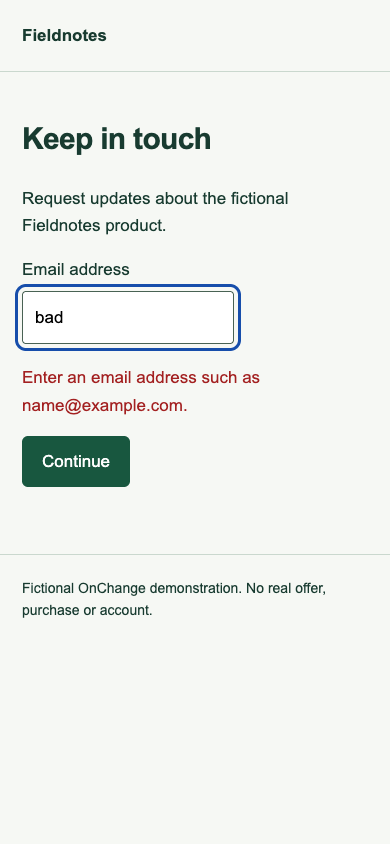
The baseline's association makes the message available through the input's description relationship. The changed version removes that relationship. The observation does not prove that the message could never be encountered by reading elsewhere on the page. It identifies which previously tested association needs another look.
Choose the retest scope
Scroll horizontally to see all columns.
| Evidence or task | Decision for this example | Next check |
|---|---|---|
| Field's error state and message association | Affected | Inspect the new input state and description after invalid submission |
| Screen-reader error announcement | Not tested by this harness | Test with the intended browser and screen-reader combinations |
| Keyboard correction journey | Needs interaction review | Submit invalid input, inspect focus, correct the value and continue |
| Unrelated fields and page journeys | No conclusion from this pair | Establish their targets, context and evidence separately |
Preserve the older finding as historical evidence. An unchanged screenshot is insufficient to reuse approval of the form's semantic error handling. A broader form evaluation should also consider error identification, correction guidance, labels, repeated submissions, summaries and any asynchronous response.
Check correction as well as failure
The harness replaces the invalid value with name@example.com and submits again. In both fixtures the error becomes hidden and the status reads “Saved for this demo.” The baseline also clears its invalid state and error reference. No data is stored or sent.
This recovery check prevents the example from treating a visible error as the whole journey. In a real form, verify that corrected fields stop exposing stale errors, entered information is retained appropriately, and successful submission is communicated in the intended way. Test a second invalid submission too when the implementation's state transitions could differ.
Read the relevant guidance in context
W3C's form notification tutorial describes ways to provide feedback and connect errors with controls. ARIA21 covers using aria-invalid to identify an error field. Understanding Error Identification explains the need to identify and describe detected input errors.
Those sources guide a wider evaluation. The absence of one particular attribute alone is not a universal failure rule: another implementation may provide an appropriate relationship or feedback mechanism. This example compares the removal of the baseline's chosen mechanism and makes the missing evidence explicit.
Inspect and repeat the evidence
The baseline form, changed form and results JSON are public. The error_state and recovery records contain the exact observations at 1440 × 900 and 390 × 844 CSS pixels.
Download the reproduction kit to repeat the interactions in Chrome, or use the form-error retest worksheet to record your own environment, result and untested areas. A human reviewer should add their name and review date only after performing the stated review.